
Remote Editing
The jEdit text editor can be used to edit remote files from your personal computer. In order to use this feature, you must first Installing Plugins the SshConsole plugin for jEdit.
To create or edit a remote text file:
- Start the ''jEdit'' application on your person computer.
- Select the menu option to "Open" a file or press Ctrl-O to open the "File Browser" dialog box.
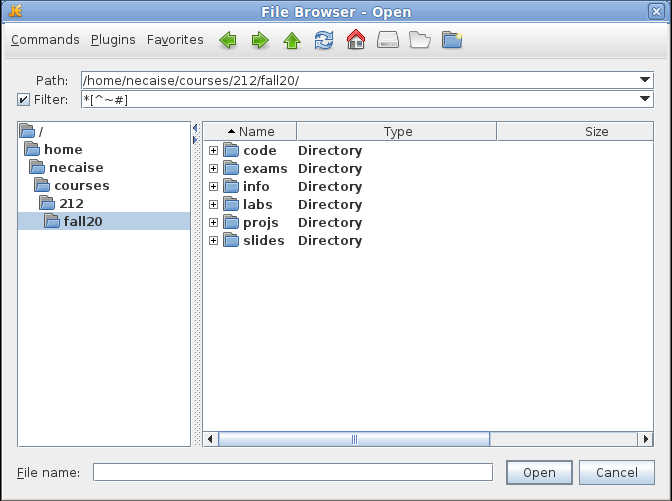
- From the "File Browser" dialog box, select "Plugins" from the menu followed "FTP" and "Connect to Secure FTP Server..."

which will open a new dialog box that allows you to connect to the department server.
- In the "Connect to Secure FTP Server" dialog box
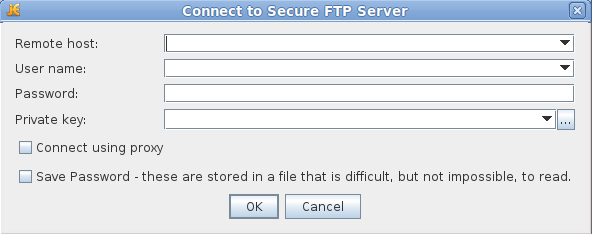
enter the following information for the first three input boxes
- Enter pascal.rmc.edu for the "Remote host".
- Enter your Linux user name for "User name".
- Enter your Linux password for "Password".
then press the "OK" button.
 If you are presented with a "Yes/No" dialog box, click "Yes". This will occur the first time that you connect to the department server from jEdit.
 - You should see the contents (files and directories) of your home directory on the department server.
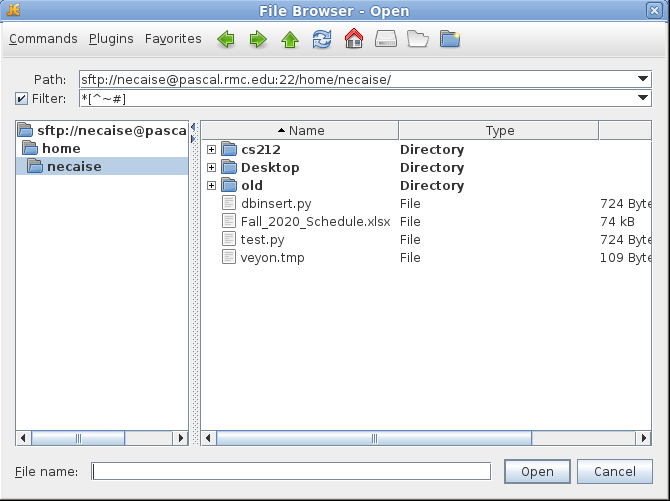
- To edit a file, use the dialog box to find the file that you want to edit and double click the file name.
- To create a new file, use the dialog box to find the location where the file is to be stored, then enter the name of the new file in the "File name:" input box and press the "Open" button.
When you save any changes to the file, those changes will be made to the file on the department server.
Once the connection is made to the department server, it remains until you close jEdit. You can open additional files from the server by selecting the appropriate menu option to open a file (or press Ctrl-O) from a tab or the window of a file previously opened on the server. If you use the "New" file option under jEdit to create a new file, then you must reconnect to the server to save the new file.